
CI/CD Pipeline: Từ Git Push Đến Production Trong 10 Phút
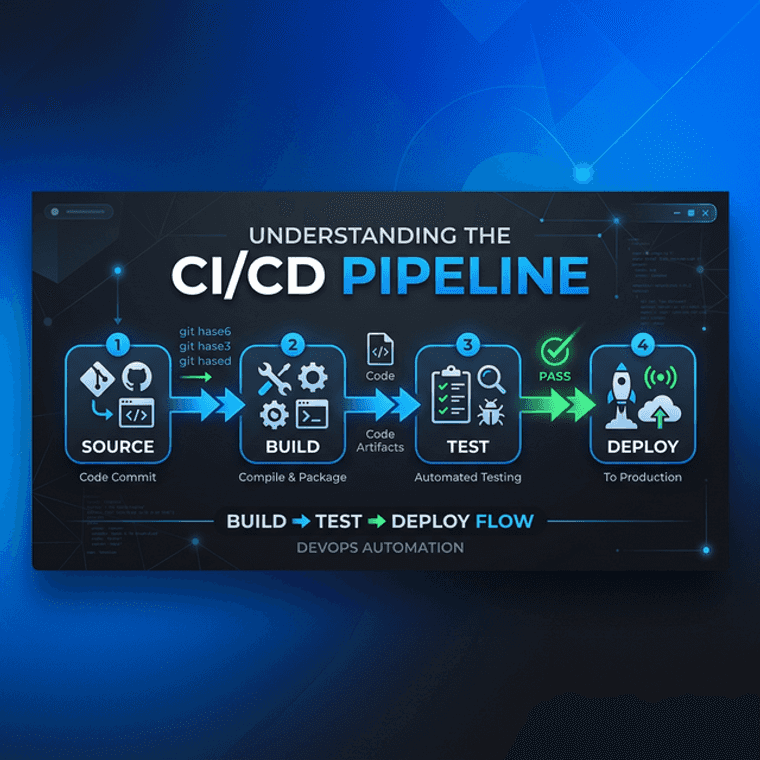
Amazon deploy 136,000 lần/ngày — trung bình mỗi 11.7 giây. Spotify: 1 deploy mỗi 15 phút per squad. Netflix push code hàng nghìn lần/ngày trên hàng trăm microservices. Bí mật chung? CI/CD pipeline tự động hóa toàn bộ process: từ code commit → build → test → deploy. Không manual steps, không "deploy bằng tay thứ 6 trưa." Theo DORA State of DevOps Report 2024, các tổ chức có CI/CD pipeline mature đạt deployment frequency cao gấp 208 lần so với nhóm low performers. BanhCuonFlow team: từ git push đến production in 10 phút. Bài viết này chia sẻ chi tiết pipeline architecture, best practices, và cách chọn tools.
CI vs CD (Delivery) vs CD (Deployment): Phân Biệt 3 Khái Niệm
🔄 CI
Continuous Integration. Mỗi commit → auto build + run tests. Developers merge code vào shared branch thường xuyên (nhiều lần/ngày). CI server phát hiện bugs sớm, trước khi merge vào main — giảm integration hell.
📦 CD (Delivery)
Continuous Delivery. Sau CI pass, build tự động deploy lên staging environment. Production deployment cần 1 click approval từ authorized team member. Code luôn ở trạng thái "sẵn sàng deploy" bất kỳ lúc nào.
🚀 CD (Deployment)
Continuous Deployment. Tự động deploy thẳng production không cần manual approval. Yêu cầu: mature test suite, comprehensive monitoring, và instant rollback capability. Amazon, Netflix dùng level này.
Hầu hết teams nên bắt đầu với Continuous Delivery — tự động hóa mọi thứ nhưng giữ 1 approval gate trước production. Chuyển sang Continuous Deployment khi: test coverage > 85%, monitoring/alerting đầy đủ, team có confidence vào pipeline. BanhCuonFlow hiện ở mức Continuous Delivery với 1-click approval cho production deploys.
Pipeline Stages Chi Tiết
Stage 1: Source → Build (2-3 phút)
Git push hoặc PR merge trigger pipeline. Build phase: compile code,
restore dependencies (NuGet packages cho .NET, npm packages cho
frontend), check lint rules. dotnet build cho backend, npm run build cho frontend. Nguyên tắc fail fast: nếu build
fail → pipeline stop ngay, notify developer qua Slack/email, liệt kê
lỗi cụ thể. Không chạy tests nếu build đã fail — tiết kiệm compute
resources. Caching dependencies giữa các runs giảm thời gian build
từ 5 phút xuống 1-2 phút.
Stage 2: Test (3-5 phút)
Unit tests — fast, isolated, chạy 100+ tests trong 30 giây. Test business logic thuần túy, không dependency bên ngoài. Integration tests — test database queries, external API calls, message queues. Dùng Testcontainers để spin up PostgreSQL, Redis containers tạm thời cho tests. Code coverage check: minimum 70% — dưới 70% pipeline fail. Security scan: Snyk hoặc Dependabot quét vulnerable dependencies tự động. SAST (Static Application Security Testing): CodeQL (GitHub) hoặc SonarQube phát hiện SQL injection, XSS patterns trong code. Parallel execution: chạy test suites đồng thời giảm tổng thời gian 50-70%.
Stage 3: Build Artifact (1-2 phút)
Docker multi-stage build → push to container registry (Docker Hub,
GitHub Container Registry, AWS ECR). Nguyên tắc Build Once, Deploy Everywhere: 1 artifact duy nhất được promote qua dev → staging → production.
Không rebuild cho mỗi environment — đảm bảo code tested = code
deployed. Tag strategy: semantic versioning (v2.1.3) +
git commit SHA (sha-abc123) + latest.
Image scanning bằng Trivy trước khi push — phát hiện CVE trong base
images và dependencies.
Stage 4: Deploy (2-3 phút)
Staging: auto-deploy mỗi merge to main branch. Chạy smoke tests và E2E tests trên staging environment — verify critical user flows (login, create task, upload file). Production: 1-click approval qua GitHub Environments hoặc GitLab protected environments. Deploy xong → wait for health endpoint return 200 OK → chạy automated smoke tests → route traffic dần dần. Nếu health check fail → auto-rollback về version trước trong 30 giây.
Shift-Left Security: Bảo Mật Từ Sớm
Truyền thống: security review cuối cùng, sau development, trước release. Vấn đề: phát hiện lỗ hổng khi code đã hoàn thành → sửa rất đắt (IBM ước tính chi phí fix bug ở production gấp 100 lần so với fix ở design phase). Shift-left = đưa security vào càng sớm càng tốt trong pipeline: pre-commit hooks scan secrets (API keys, passwords trong code), CI stage chạy SAST + dependency scanning, container image scanning trước khi push, DAST (Dynamic Application Security Testing) trên staging. GitLab và GitHub đều cung cấp built-in security scanning dashboards.
Deployment Strategies: Chọn Phù Hợp
Rolling Update: Replace instances dần dần — v1 pods được thay bằng v2 pods từng cái một. Không downtime, rollback bằng 1 command. Đơn giản nhất, default trong Kubernetes và Docker Swarm. Nhược điểm: trong quá trình rollout, cả v1 và v2 cùng serve traffic — phải đảm bảo backward compatibility.
Blue-Green: Duy trì 2 environments giống nhau (Blue = đang live, Green = version mới). Deploy vào Green, chạy full test suite, rồi switch traffic từ Blue sang Green bằng load balancer. Instant rollback = switch traffic lại Blue. Ưu điểm: zero downtime, fast rollback. Nhược điểm: cần gấp đôi infrastructure resource — tốn kém cho ứng dụng lớn.
Canary: Route 5% traffic vào v2, monitor error rates và latency. Nếu metrics OK → tăng lên 25% → 50% → 100%. Nếu error rate tăng → rollback 5% chỉ ảnh hưởng rất ít users. Risk thấp nhất trong tất cả strategies. Thường dùng feature flags kết hợp để có thể enable/disable features cho specific user groups.
So Sánh CI/CD Tools 2025-2026
GitHub Actions: Native tích hợp GitHub — repo + CI/CD cùng 1 nơi. YAML config dễ học, marketplace 20,000+ reusable actions, generous free tier (2,000 minutes/tháng cho public repos, 500 cho private). Matrix strategy test multi-platform. BanhCuonFlow sử dụng GitHub Actions cho tất cả CI/CD workflows. Phù hợp: mọi quy mô team đã dùng GitHub.
GitLab CI: Built-in với GitLab, pipeline visualization đẹp nhất (DAG view), self-hosted runner cho on-premise. Auto DevOps tự generate pipeline cho common frameworks. Security scanning dashboards tích hợp sẵn. Phù hợp: team cần on-premise hoặc all-in-one platform. Jenkins: Open-source, on-premise, 1,800+ plugins — fully customizable. Nhưng maintenance heavy, UI cũ, cần Jenkins admin riêng. Phù hợp: enterprise có legacy CI/CD. Azure DevOps: Microsoft ecosystem (tích hợp Azure, Visual Studio), boards + repos + pipelines unified. Phù hợp: team dùng Azure cloud và .NET stack.
Best Practices Pipeline 2025
1. Pipeline dưới 10 phút: Developers mất focus nếu chờ pipeline lâu hơn. Optimize: cache dependencies, parallel test execution, incremental builds. 2. Version control everything: Pipeline config (YAML), Dockerfile, Terraform/IaC, database migrations — tất cả trong Git. 3. Notifications rõ ràng: Pipeline fail → Slack message với: ai commit, branch nào, test nào fail, link đến logs. Pipeline pass → không cần notification (avoid noise). 4. Secret management: Dùng GitHub Secrets, HashiCorp Vault, hoặc cloud KMS. Không hardcode secrets trong pipeline YAML.